Step 01: To earn my degree in Graphic Designer specializing in Digital Creation, learning to code was mandatory. This project was my first dive into creative coding for generative packaging.
The assignment required us to design dynamic packaging for an object starting with our first name's initial. While the obvious choice for "L" was a book (libro), I took a bolder path …
The brief set specific technical rules:
The Concept: Design dynamic packaging based on a personal initial ("L" for Laura).
The Logic: Use the random() function in p5.js to dynamically vary scale, stroke weight, and color fills across a geometric grid of diamonds.
Interactivity: Build keyboard commands to make the canvas user-responsive.
Instead of designing a static box, I built an algorithmic design system. By combining a warm color palette with random parameters, the program generates infinite visual variations ensuring no two packages are ever identical.
Step 02 — Feel the Love
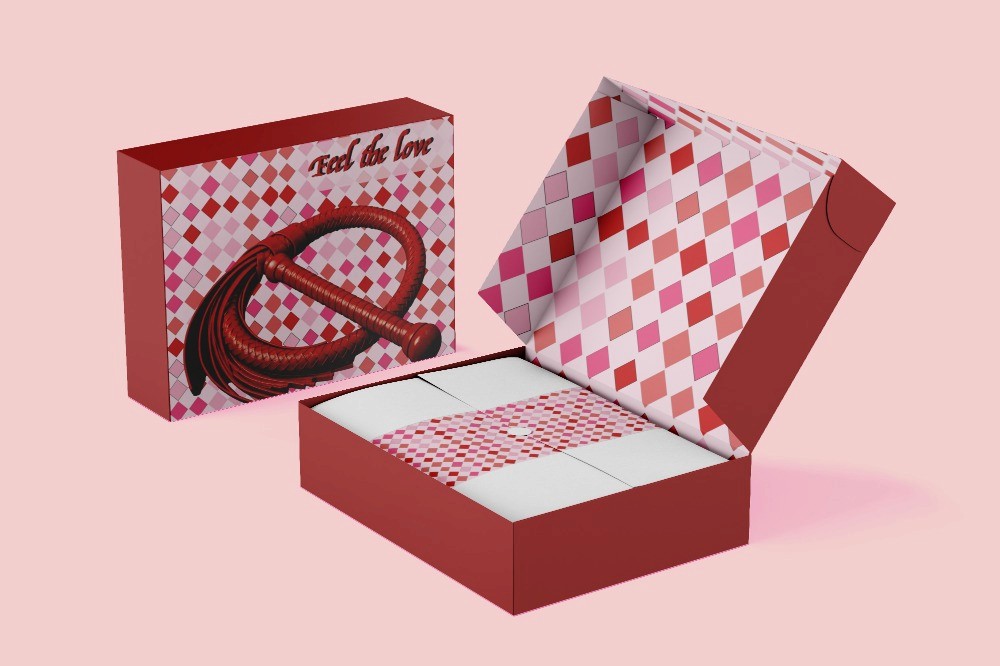
For the second step, I translated the generative visual system into a physical packaging concept created for Valentine’s Day.
I chose a whip as the object, using it as a playful and unexpected interpretation of my initial, “L”. Instead of following the traditional romantic language associated with Valentine’s Day, I wanted to introduce a more provocative and humorous approach.
The concept was named “Feel the Love”, combining the romantic context of Valentine’s Day with the playful tension of the object itself. The packaging was designed to make the contrast between love, seduction, and surprise part of the experience.
The generative graphics developed in the previous step were then applied to the packaging, connecting the digital system with the final physical object.
Step 3. Development of the Interactive Prototype
To develop the interactive mockup, I used the same p5.js library and worked directly with code. Starting from the design created previously, I added different visual elements and interactive functions to transform the static proposal into a small interactive web experience.
First, I programmed the top promotional banner. The text moves continuously from one side of the canvas to the other and, once it leaves the canvas completely, it starts again from the opposite side. I also added a keyboard interaction: when the user presses the spacebar, the text changes colour, creating a direct response to the user’s action.
I then added the product image through code and adjusted its position and size so that it would fit into the mockup composition. I also programmed the product description to move horizontally from the side of the canvas until it reaches its intended position.
One of the main interactive elements is the heart. Its movement is programmed using the trigonometric functions cos() and sin(), which create an orbital movement around a central point. I increased the radius of the orbit to make the movement more noticeable within the composition. In addition, the size of the heart changes according to its horizontal position and the mouse position on the X axis, so the user’s movement directly affects the visual element.
Finally, I added the “ADD TO CART” button as part of the interface. In this version, it mainly functions as a visual element of the mockup rather than as a real shopping system, but its appearance and position are programmed with code to maintain the connection with the original prototype.
The complete result was created through code in p5.js, using variables, functions, animation, image loading, and keyboard and mouse interaction. In this way, the mockup is not only a visual representation of the original design, but also an interactive version of it.
I also provide the code used to create the exercise so that it can be consulted, reused, or downloaded.
BEYOND FIGMA: GENERATIVE PACKAGING
Interactive Pattern Engine Built with p5.js
Step 01: To earn my degree in Graphic Designer specializing in Digital Creation, learning to code was mandatory. This project was my first dive into creative coding for generative packaging.
The assignment required us to design dynamic packaging for an object starting with our first name's initial. While the obvious choice for "L" was a book (libro), I took a bolder path …
The brief set specific technical rules:
The Concept: Design dynamic packaging based on a personal initial ("L" for Laura).
The Logic: Use the random() function in p5.js to dynamically vary scale, stroke weight, and color fills across a geometric grid of diamonds.
Interactivity: Build keyboard commands to make the canvas user-responsive.
Instead of designing a static box, I built an algorithmic design system. By combining a warm color palette with random parameters, the program generates infinite visual variations ensuring no two packages are ever identical.
Step 02 — Feel the Love
For the second step, I translated the generative visual system into a physical packaging concept created for Valentine’s Day.
I chose a whip as the object, using it as a playful and unexpected interpretation of my initial, “L”. Instead of following the traditional romantic language associated with Valentine’s Day, I wanted to introduce a more provocative and humorous approach.
The concept was named “Feel the Love”, combining the romantic context of Valentine’s Day with the playful tension of the object itself. The packaging was designed to make the contrast between love, seduction, and surprise part of the experience.
The generative graphics developed in the previous step were then applied to the packaging, connecting the digital system with the final physical object.
Step 3. Development of the Interactive Prototype
To develop the interactive mockup, I used the same p5.js library and worked directly with code. Starting from the design created previously, I added different visual elements and interactive functions to transform the static proposal into a small interactive web experience.
First, I programmed the top promotional banner. The text moves continuously from one side of the canvas to the other and, once it leaves the canvas completely, it starts again from the opposite side. I also added a keyboard interaction: when the user presses the spacebar, the text changes colour, creating a direct response to the user’s action.
I then added the product image through code and adjusted its position and size so that it would fit into the mockup composition. I also programmed the product description to move horizontally from the side of the canvas until it reaches its intended position.
One of the main interactive elements is the heart. Its movement is programmed using the trigonometric functions cos() and sin(), which create an orbital movement around a central point. I increased the radius of the orbit to make the movement more noticeable within the composition. In addition, the size of the heart changes according to its horizontal position and the mouse position on the X axis, so the user’s movement directly affects the visual element.
Finally, I added the “ADD TO CART” button as part of the interface. In this version, it mainly functions as a visual element of the mockup rather than as a real shopping system, but its appearance and position are programmed with code to maintain the connection with the original prototype.
The complete result was created through code in p5.js, using variables, functions, animation, image loading, and keyboard and mouse interaction. In this way, the mockup is not only a visual representation of the original design, but also an interactive version of it.
I also provide the code used to create the exercise so that it can be consulted, reused, or downloaded.
BEYOND FIGMA: GENERATIVE PACKAGING
Interactive Pattern Engine Built with p5.js
Step 01: To earn my degree in Graphic Designer specializing in Digital Creation, learning to code was mandatory. This project was my first dive into creative coding for generative packaging.
The assignment required us to design dynamic packaging for an object starting with our first name's initial. While the obvious choice for "L" was a book (libro), I took a bolder path …
The brief set specific technical rules:
The Concept: Design dynamic packaging based on a personal initial ("L" for Laura).
The Logic: Use the random() function in p5.js to dynamically vary scale, stroke weight, and color fills across a geometric grid of diamonds.
Interactivity: Build keyboard commands to make the canvas user-responsive.
Instead of designing a static box, I built an algorithmic design system. By combining a warm color palette with random parameters, the program generates infinite visual variations ensuring no two packages are ever identical.
Step 02 — Feel the Love
For the second step, I translated the generative visual system into a physical packaging concept created for Valentine’s Day.
I chose a whip as the object, using it as a playful and unexpected interpretation of my initial, “L”. Instead of following the traditional romantic language associated with Valentine’s Day, I wanted to introduce a more provocative and humorous approach.
The concept was named “Feel the Love”, combining the romantic context of Valentine’s Day with the playful tension of the object itself. The packaging was designed to make the contrast between love, seduction, and surprise part of the experience.
The generative graphics developed in the previous step were then applied to the packaging, connecting the digital system with the final physical object.
Step 3. Development of the Interactive Prototype
To develop the interactive mockup, I used the same p5.js library and worked directly with code. Starting from the design created previously, I added different visual elements and interactive functions to transform the static proposal into a small interactive web experience.
First, I programmed the top promotional banner. The text moves continuously from one side of the canvas to the other and, once it leaves the canvas completely, it starts again from the opposite side. I also added a keyboard interaction: when the user presses the spacebar, the text changes colour, creating a direct response to the user’s action.
I then added the product image through code and adjusted its position and size so that it would fit into the mockup composition. I also programmed the product description to move horizontally from the side of the canvas until it reaches its intended position.
One of the main interactive elements is the heart. Its movement is programmed using the trigonometric functions cos() and sin(), which create an orbital movement around a central point. I increased the radius of the orbit to make the movement more noticeable within the composition. In addition, the size of the heart changes according to its horizontal position and the mouse position on the X axis, so the user’s movement directly affects the visual element.
Finally, I added the “ADD TO CART” button as part of the interface. In this version, it mainly functions as a visual element of the mockup rather than as a real shopping system, but its appearance and position are programmed with code to maintain the connection with the original prototype.
The complete result was created through code in p5.js, using variables, functions, animation, image loading, and keyboard and mouse interaction. In this way, the mockup is not only a visual representation of the original design, but also an interactive version of it.
I also provide the code used to create the exercise so that it can be consulted, reused, or downloaded.